

Retargeting 101: Bring Back the “I’ll Think About It” Customer

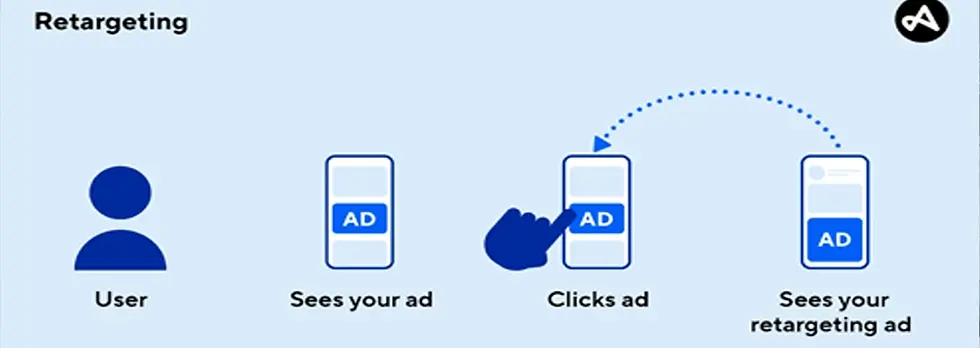
Every wireless store and repair shop has the same problem: people show interest, ask a question, click around, then disappear. They’re not saying “no.” They’re saying “I’ll think about it.”
Retargeting is how you bring those people back—by showing simple ads to warm traffic (website visitors, page engagers, video viewers, and message starters) with the right offer and the right message at the right time.
This guide gives you a clean Retargeting 101 setup: who to target, what to say, and what to offer to turn warm traffic into calls and walk-ins.
What Retargeting Is (And Why It Works)
Retargeting means running ads to people who already interacted with your business.
They visited your website (repair page, contact page, directions page)
They engaged with your Facebook/Instagram content
They watched your videos
They messaged you but didn’t come in
Why it works: you’re not paying to convince strangers. You’re paying to remind warm prospects and reduce friction so they choose you today.
Step 1: Pick Your Goal (Keep It Simple)
For local wireless/repair stores, retargeting should drive one of these actions:
Calls (fastest path to a repair ticket)
Messages (quotes, model checks, availability)
Directions / walk-ins (local intent)
Simple rule: pick one primary action per campaign. Don’t mix everything at first.
Step 2: Build the “Warm Audiences” (Who to Target)
If you’re starting from zero, these audiences are enough to win.
Audience A: Website Visitors (Last 30 Days)
Best for: repairs, accessories, activations, upgrades.
All website visitors (30 days)
Optional: split by high-intent pages (Repair, Contact, Directions)
Audience B: High-Intent Website Visitors (Last 7–14 Days)
Best for: “I need this now” services.
Visited repair pages
Visited pricing pages
Visited contact/directions pages
Audience C: Facebook/Instagram Engagers (Last 365 Days)
Best for: steady local reminders + repeat visits.
People who liked, commented, saved, or shared
People who visited your profile/page
Audience D: Video Viewers (Last 30–90 Days)
Best for: trust-building then conversion.
25%+ viewers (warm)
50%+ viewers (hot)
Audience E: Message Starters (Last 30–180 Days)
Best for: the easiest wins.
These people already raised their hand. Retarget them with a “finish the job” message.
Audience Windows (How Far Back to Target)
Repairs: 7–14 days (urgent)
Accessories: 14–30 days
Activations: 30–60 days
Upgrades: 30–90 days
Rule: the more urgent the problem, the shorter the window.
Step 3: Choose 3 Ad Angles (What to Say)
Retargeting ads should feel like a helpful reminder, not a hard sell. The best angles are:
Angle 1: Problem + Fast Solution
“Still dealing with that cracked screen?”
“Phone charging on/off?”
“Battery dying fast?”
Angle 2: Trust + Proof
Local shop, walk-ins welcome
Reviews/testimonials
“We’ll give you clear options by model”
Angle 3: Offer + Deadline
Bundle deal ends Sunday
$10–$20 off repairs this week
Free diagnostic/quote (if you can support it)
Copy/Paste Retargeting Ad Scripts (Warm Traffic → Walk-Ins)
Ad Script #1: Screen Repair Reminder
Primary text: Still dealing with that cracked screen? We offer fast repair options for many models. Get a quick quote and stop in today—walk-ins welcome.
Headline: Fast Screen Repair Options
Description: Quick quote • Local shop • Walk-ins welcome
Ad Script #2: Battery / Charging Issue
Primary text: Phone dying fast or charging on/off? Bring it in for a quick check. We’ll confirm what’s going on and give you the fastest fix option.
Headline: Battery & Charging Help
Description: Quick check • Clear options • Local support
Ad Script #3: Accessory Bundle (High Margin)
Primary text: Protect your phone the right way. This week: case + screen protector + install bundle for $[X]. Tell us your model and we’ll fit it in-store. Ends [Day].
Headline: Case + Protector Bundle
Description: Model-fit • Installed in-store • Ends soon
Need stronger bundle inventory? Source through Accessories vendors in the Wireless Dealer Group directory.
Ad Script #4: “Message Us for a Quote” (DM Conversion)
Primary text: Quick question—still need help with your phone? Message us your model + what’s going on and we’ll reply with the fastest option and estimate.
Headline: Need Help? Message Us
Description: Fast reply • Quick quote • Local shop
Ad Script #5: Trust + Reviews
Primary text: Looking for a reliable local wireless & repair shop? We help customers with repairs, accessories, and setup every day. Stop by when you’re ready—we’ll take care of you.
Headline: Trusted Local Phone Repair
Description: Repairs • Accessories • Setup help
Step 4: Offers That Convert Warm Traffic (Without Killing Margin)
Warm traffic doesn’t need huge discounts. They need a reason to act now.
Best retargeting offers for wireless/repair stores
Accessory bundle pricing (case + protector + install)
Free diagnostic / quote (if you can support it)
$10–$20 off screen repair (or diagnostic credit)
Free setup/data transfer check with purchase
Charger + cable bundle (travel/holiday angle)
To increase conversion and ticket size, pair offers with protection options via Insurance.
Step 5: The Simplest Campaign Build (2 Campaigns)
You don’t need a complicated account. Start with two campaigns:
Campaign 1: Repairs Retargeting
Audience: website visitors 14 days + high-intent visitors 7 days
Creative: screen + battery + charging ads
CTA: Call now / Get directions
Campaign 2: Accessories + Repeat Visits
Audience: page engagers 365 days + video viewers 90 days
Creative: bundle deal + “protect your phone” angle
CTA: Message us / Get directions
Budget starter
$5–$15/day per campaign
Run for 14 days before major changes
Refresh creative monthly (new photo/video, new hook, new offer)
Step 6: Creative That Works (No Fancy Production)
Before/after repair photo
10–15 sec bench video (vertical)
Accessory wall “bundle” video
Simple text graphic: “Case + Protector + Install $X (Ends Sunday)”
Review screenshot (with permission)
To keep repairs fast and content consistent, support your bench with Repair Parts & Tools.
Step 7: Optimization Routine (15 Minutes, 2x/Week)
Check frequency (don’t annoy people)
Rotate creatives if results drop
Watch messages/calls quality (not just clicks)
Test one new offer angle per month
Essential Resources for Wireless Dealers
Wireless Dealer Group Directory – Find vendors and services built for wireless dealers
Accessories – Bundle-friendly inventory for retargeting offers
Insurance – Protection add-ons that boost conversion
Marketing Services – Help with ads, creative, and conversion
Website Development – Landing pages that convert retargeting clicks
Repair Parts & Tools – Keep turnaround fast for warm leads
POS Systems – Track attach rate and repeat visits
Business Services – Operations support and promo workflows
Conclusion
Retargeting is how you bring back the “I’ll think about it” customer. Start with warm audiences (website visitors, engagers, video viewers, message starters), use simple ad angles (problem + solution, trust + proof, offer + deadline), and run two campaigns with small budgets. Keep the creative real, keep the CTA simple, and you’ll turn warm traffic into calls and walk-ins consistently.
For better offers and inventory to support retargeting promos, explore the Wireless Dealer Group directory and categories like Accessories.


Comments